这篇写什么?
做 Android / 音频这类大仓时,每天都在:查是谁改的、暂存切分支、拉代码冲突、挑提交、回退救场。
本文按使用频率整理成一份中文备忘,并补上容易踩坑的点(尤其是 reset --hard、二进制冲突、--ours / --theirs)。
一句话:
查清历史 → 干净地切分支 / 拉代码
  → 提交与推送
  → 跨分支 cherry-pick
  → 回退用 reset,后悔用 reflog
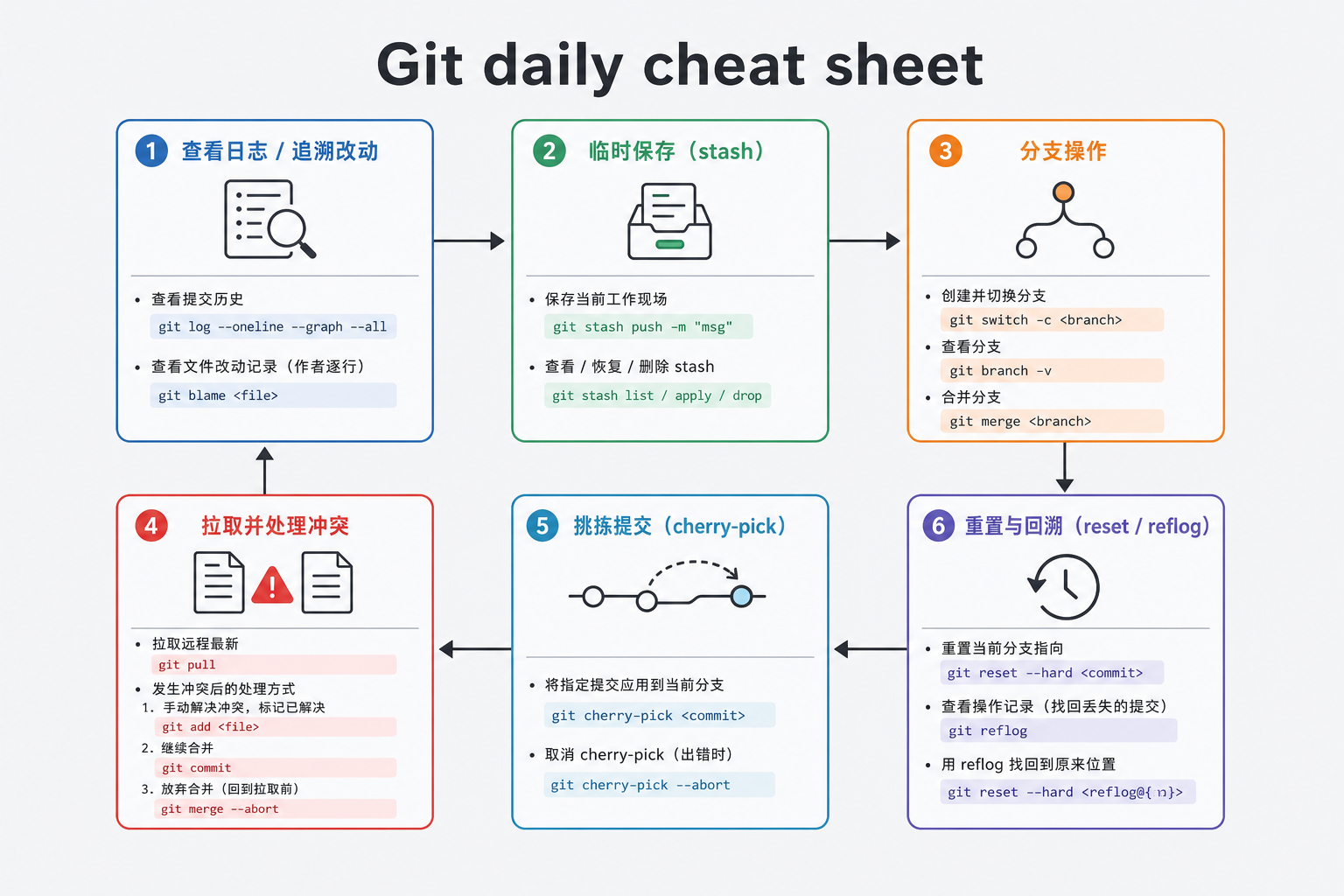
文中路径、分支名用通用示例;你换成自己的仓库即可。危险命令(
--hard、强推)请先确认再执行。
一、查看提交日志
# 最近提交
git log

# 只看最近 5 条
git log -n 5

# 某人的提交
git log --author="liangkun"

# 更紧凑
git log --oneline -n 20
看每个提交改了哪些文件、多少行
git log --stat
git log --stat -n 5
补:直接看某次提交的补丁
git show <commit哈希>
git show <commit哈希> --stat
二、某行代码是谁改的:blame + show
# 看文件每一行最后一次修改的人 / 提交
git blame path/to/file.h

# 只筛和某段内容相关的行
git blame path/to/alsa_manager.h | grep "AML_AUDIO_OUT_DEV_TYPE_SPEAKER1"

# 拿到哈希后,看那次提交完整内容
git show <哈希>
补: 想看某一段行号范围:
git blame -L 120,160 path/to/file.c
三、拉取前后差了什么
git pull 之后,想对比「拉之前 vs 现在」:
git diff HEAD@{1} HEAD
| 写法 | 含义 |
|---|---|
HEAD |
当前提交 |
HEAD@{1} |
reflog 里「上一个 HEAD 位置」(常是 pull 前) |
补: 只看文件名:
git diff --name-status HEAD@{1} HEAD
四、暂存后切分支:stash
手头改到一半,要临时去别的分支:
git stash
git checkout other-branch

# 回来后恢复
git stash pop
# 或只应用不删除栈:git stash apply
常用:
git stash list
git stash show -p stash@{0}
补: 含未跟踪新文件时:
git stash -u
五、git pull 时本地有未提交改动
三种常见处理:
5.1 先提交再拉
git add .
git commit -m "描述你的更改"
git pull
# 或:git pull --rebase
5.2 先 stash 再拉(暂不想提交)
git stash
git pull
git stash pop
5.3 丢弃本地改动再拉(不可恢复,慎用)
git reset --hard
git pull
| 方案 | 适用 |
|---|---|
| commit | 改动有价值,要留在历史上 |
| stash | 改动有价值,但还不想成 commit |
reset --hard |
确定本地垃圾改动可以扔掉 |
六、创建 / 切换 / 推送自己的分支
# 基于当前 HEAD 建分支并切换
git checkout -b yourbranch
# 新版等价:git switch -c yourbranch

# 基于远程某分支创建
git checkout -b yourbranch origin/basebranch

# 推到远程并建立跟踪
git push -u origin yourbranch
分步写法:
git branch yourbranch
git checkout yourbranch
七、删除分支
# 本地
git branch            # 列表
git branch -d name    # 已合并才删
git branch -D name    # 强制删

# 远程
git branch -r
git push origin -d name
补: 删远程后本地清理过期远程跟踪分支:
git fetch --prune
八、日常改代码 → 合并主干 → 提交推送(典型流程)
git status
git stash                      # 若当前工作区脏
git checkout master            # 或 main
git pull
git checkout yourbranch
git merge master               # 把主干合进自己分支
git stash pop                  # 若之前 stash 了
git status
git add .
git commit -m "注释"
git push
查看某次提交:
git show b747313165
九、提交到远程前的常用清理
# 看改了什么
git diff .
git status .

# 取消暂存(保留工作区修改)
git reset HEAD path/to/file.c

# 丢弃某文件工作区修改(不可恢复)
git checkout -- path/to/file.c
# 新版:git restore path/to/file.c
提交与推送:
git add path/to/file.java
git commit -m "xxx"
git pull --rebase          # 先把别人的提交接到你下面,历史更直
git push origin yourbranch
推错了怎么办?
| 情况 | 做法 |
|---|---|
| 已 push | 用 git revert <哈希> 生成「反向提交」再 push(安全,适合共享分支) |
| 还没 push | git reset --soft <旧哈希> 回退提交但保留改动,再重新 commit |
git revert 9b747313165986b660
git reset --soft 15757914116eddbc4b012f9bcee288be9d906671
共享分支尽量避免
reset --hard+push --force。
十、跨仓库 / 跨分支 cherry-pick
把分支 A 上的几笔提交,接到分支 B:
cd /path/to/target-repo
git checkout target-branch

# 若源在另一个本地仓库,可先加 remote
git remote add other /path/to/source-repo
git fetch other source-branch

# 按时间顺序逐个挑
git cherry-pick <hash1>
git cherry-pick <hash2>
git cherry-pick <hash3>

# 有冲突:改文件 → add → 继续
git cherry-pick --continue
# 放弃这次 pick:git cherry-pick --abort

git push origin target-branch
二进制冲突(如 .apk)
Git 无法自动合并二进制,需要二选一:
git status   # 看到 both modified

# 用「被 pick 进来的那一方」(cherry-pick 语境下常叫 theirs)
git checkout --theirs path/to/app.apk
git add path/to/app.apk

# 或保留当前分支版本
git checkout --ours path/to/app.apk
git add path/to/app.apk

git cherry-pick --continue
补: ours / theirs 在 merge 和 cherry-pick/rebase 里含义容易反着记。拿不准就:
git show :2:path/to/file   # 一方
git show :3:path/to/file   # 另一方
或直接用明确来源覆盖后再 git add。
十一、回退到指定提交 / 再救回来
硬回退(丢弃之后所有本地提交与工作区)
git reset --hard 4bf967474d45061ea959745661a9c90579356d9d
回退后又想回到「以前最新」
git fetch
git log --oneline --graph --all
git reset --hard 854a9e6          # 选你想恢复到的哈希
# 若远程分支还在:git reset --hard origin/yourbranch
补: 不确定哈希时先看:
git reflog
十二、导出 patch
# 某个已有 commit → patch 文件
git format-patch -1 d163256d0ba9f3c2fd6264d53bebd6be280fafed -o ./patches

# 当前未提交 diff → 一个文件
git diff > ./patches/my_change.patch
应用:
git apply ./patches/my_change.patch
# 或:git am 0001-xxx.patch
十三、交互式 rebase:删提交 / 压成一个
删掉中间某几笔
先找到「要保留的起点」的父提交,再:
git rebase -i 75d2b17ba3158826d4c07fb60418c3f46e50b657
编辑器里把不要的行改成 drop(或删掉该行),保存退出。
rebase 搞砸了:回到 rebase 前
git reflog
# 找到 rebase 开始前的 HEAD@{n}
git reset --hard HEAD@{4}
或正在 rebase 中途:
git rebase --abort
多个 commit 压成一个(squash)
注意:列表里第一行必须是 pick,后面才能 squash / s。
pick   245ce7b  fix build error +2
squash de41801  fix build error +1
squash 1ba3f71  fix build error
squash 16f3bc1  add permission
冲突时:
git status
# 编辑冲突文件,去掉 <<<<<<< ======= >>>>>>>
git add <file>
git rebase --continue
合并完成后改说明:
git commit --amend
不满意整体:
git rebase --abort
十四、一张「先想清楚再敲」对照表
| 目的 | 优先命令 | 危险度 |
|---|---|---|
| 查谁改的行 | blame + show |
低 |
| 临时切走 | stash |
低 |
| 拉代码有本地改动 | commit / stash /(慎)hard | 中~高 |
| 只要某几笔 | cherry-pick |
中(冲突) |
| 改历史形状 | rebase -i |
中(已 push 更危险) |
| 本地整段扔掉 | reset --hard |
高 |
| 救回误操作 | reflog → reset --hard |
中 |
| 已 push 的错提交 | revert |
低(推荐) |
十五、再补几条高频命令
# 当前分支跟踪谁、是否领先/落后
git status -sb

# 只下载不合并
git fetch origin

# 看两个分支差哪些提交
git log --oneline branchA..branchB

# 暂存区与上次提交的差
git diff --cached

# 改最后一次提交说明(尚未 push 或确认可改)
git commit --amend -m "新说明"
小结
日常记住五件事就够应付大半场景:
- 查:
log/blame/show/diff - 躲:
stash再切分支、再pull - 交:
add→commit→pull --rebase→push - 挑:
cherry-pick,二进制冲突用手选 ours/theirs - 救:
reflog+reset;已共享历史优先revert
把这份当速查表即可;真正危险的是 --hard 和强推,敲之前先 status 和 reflog 看一眼。
相关阅读
评论
还没有评论,来做第一个吧
有想法?直接在这说,不用跑留言板